BlogQuill
How to rewrite your Teams messages and e-mails in the right tone, without leaving the app
Your colleague, a client, your landlord, your friends: each one expects a different tone. How to stop pasting into an AI chat and do it with one key, in the app you're already writing in.
By Roberto Ríos7 min read
The short answer. Select the message, press ⌃⌥R, choose who it's for — Work, Formal, Friends… — and press ↵: Quill swaps it in right there, in Teams, Mail or Notes, without you leaving the app. It's free, open source, and I made it. If you only proofread now and then and your Mac has Apple Intelligence, the system's Writing Tools will do.
It's half past nine and this is half-written in Teams: "ok will look tmrw cant today, do u have it or should i ask alex?". It's going to your boss, not a colleague. You copy it, open an AI chat, paste it, ask for "more professional, but don't overdo it", copy the answer, go back to Teams, paste it, and delete the "I hope this message finds you well!" nobody asked for.
Half an hour later, the same with the e-mail to a client. In the afternoon, the message to your landlord. And at night you write to your friends without fixing a thing, because the last thing you want there is to sound like a press release.
The problem isn't bad writing: each reader wants a different tone
What you write to a friend, a client or a lawyer isn't fixed the same way. With a friend you want the typos gone and the "lol" kept; with a colleague, clear sentences and no filler; with a client, formal register and no slang. And with all of them, nothing added that you didn't say.
Fixing it that way has two costs, and most tools solve only one:
- The round trip. The text is in Teams or your e-mail and the tool that rewrites it is in another window. Copying, pasting, asking, copying and coming back costs more than the fix, so you often send it as it is.
- The tone. A "more professional" button doesn't know who you're writing to, and an AI with no instructions tends to embellish: it adds greetings, promises or facts that weren't there.
What your Mac already does
If your Mac has Apple Intelligence, it has Writing Tools: select text, right-click, and you can proofread it or make it friendlier, more professional or more concise. It runs on the Mac itself, it's free, and for a quick pass it's very good.
What you can't do is decide what each tone means. "Professional" is what Apple decided it is: you can't teach it how you write, ask for one tone in Teams and another in e-mail, or pick a different model when a text resists.
Quill: each reader's tone, one key away
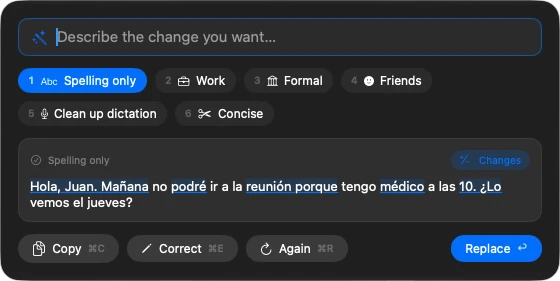
So I built Quill, a macOS app that rewrites the text you select. It works in three steps:
- Select the message, in whatever app you're in.
- Press ⌃⌥R. A panel appears next to the text, already rewriting it with that app's profile or the last one you used. Switch profiles with 1…9 or a click.
- Press ↵. The text is replaced where it was. Or copy it with ⌘C, or correct it first with ⌘E.
Try it here:
A profile for everyone you write to
Quill comes with six profiles. Each one carries examples that show the model what that tone means; here they are:
Notice what does not change: in Friends the slang and the emoji stay; in Formal no new date or obligation appears; in Concise the shipment is still late. Each profile changes what it has to and nothing else.
And when no profile fits, type what you want in the panel — "shorter", "in Spanish", "warmer", "less stiff" — and press ↵.
Make it yours
This is the difference from a fixed-tone button. It all happens in Quill's settings, from its menu bar icon:
- One profile per app. In Settings › Apps, click Add an App and choose its profile: Work in Teams, Formal in Mail, Friends in Messages. From then on, ⌃⌥R always starts with the profile of the app you're in. If you like, turn on Apply directly and Quill replaces without showing the panel, as long as the result needs no review and the app can undo it.
- Your own profiles. In Settings › Profiles, New Profile: give it a name ("Customer support", "E-mails to the accountant"), choose register and length, and write your guidance. Before using it, Try It runs it on sample texts you keep.
- Teach it with your corrections. If a result isn't right, ⌘E lets you correct it and keep the correction as an example for that profile. Next time it writes more like you.
- Share them. Export… saves a profile to a file a colleague can open with Import…: the same tone for the whole team.
You choose who rewrites
Quill doesn't ship a model and has no server: it uses the one your Mac already has or the one you choose, with your own key.
Each model carries a label per profile — works well, may need review or not recommended — taken from a bench of real cases, not guessed. With a cloud model you pay the provider for what you use: with Gemini 3.8 Flash, rewriting a short message costs less than a cent, at October 2026 prices.
It doesn't say what you didn't say (and if it does, it tells you)
In a message to a client, the danger isn't a comma: it's the AI inventing a delivery date or a "we guarantee". Before you can apply a result, Quill checks it:
If the model makes something up, you see it before anyone else does:
![Quill's picker with a result that made things up: the text "Dear [Name], hello John." and two warnings, "It adds placeholders: [Name]" and "It adds a greeting".](/images/blog/rewrite-in-any-app/flagged-en.webp)
Your text goes where you say
A program that reads what you select in Teams or your e-mail has to be clear about what it does with it:
Get started in a minute
- Download Quill, open the DMG and drag it onto Applications.
- Open it. A short walkthrough asks for macOS's Accessibility permission, which is what lets it read the selection and replace it, and helps you choose a model. For the best quality today, an OpenRouter key with Gemini 3.8 Flash.
- Select a message and press ⌃⌥R. Or use the contextual menu: Services › Rewrite with Quill.
What it doesn't do (yet)
- Verified in Teams, Mail, Notes and TextEdit. It's built for any app where you can select text (when it can't read the selection directly, it copies it), but I haven't finished testing Slack or browsers. If something breaks in your app, telling me on GitHub helps a lot.
- In Teams it can't check the result. Teams doesn't let other apps read its text box, so Quill pastes and can't read it back to confirm: have a look before you send.
- It works with plain text. If what you select has bold or formatted links, the result loses them, and Quill warns you before replacing.
- It doesn't rewrite whole documents. It's made for messages, e-mails and paragraphs, not a twenty-page report.
- It keeps no history of what you rewrite.
- Apple's model isn't there yet on the built-in profiles in the bench, so for the best quality you need a key from a provider (OpenRouter, Vercel or OpenAI) or a server of your own.
- It needs macOS 26 or later on an Apple Silicon Mac. The interface is in English and Spanish.
If you write to the same person all day, you probably don't need it. If in one morning you go from your boss to a client and from the client to your friends, and you're tired of the round trip to an AI chat, Quill is my way of making the right tone one key away: quill.rrios.dev.