BlogQuill
How to transcribe your Teams meetings on a Mac and leave with the minutes done — no bot, no audio kept
Who committed to what, by when, and what was left open. How to have it when you hang up, with every person by name and translated if the meeting was in another language, without putting a bot in the call.
By Roberto Ríos7 min read
The short answer. When Teams — or Zoom, Meet or whatever app you use — opens the microphone, Quill offers to transcribe the call. It transcribes it on your Mac, tells the voices apart so you can give them names and roles as you talk, translates it live if it's in another language and, when you hang up, gives you the minutes: decisions, tasks with owner and date, risks and disagreements. It puts no bot in the meeting and keeps no audio. It's free, open source, and I made it.
You hang up a forty-minute meeting with five people. You've decided things, someone committed to something "by Friday", and someone else disagreed but let it go. Half an hour later you no longer remember whether Lucía or Andrés was sending the runbook, or whether the provider's date was confirmed or just promised.
Taking notes while you talk doesn't work: you either listen or you write. And what you jot down is what seemed important to you, not what was said.
What there is today, and what it costs
- The app's own transcription. Teams and Zoom have one, but it depends on your organisation turning it on and on who organises the meeting. And the smart summary usually comes with a separate licence.
- A bot that joins the call. Services like Otter or Fireflies usually add a participant that records and processes the audio in their cloud. It works, but everyone sees the guest, and your meeting's audio goes to a third party.
- Record it and hand it to an AI. You're left with an audio file to keep, delete and upload, and the summary arrives long after you hang up.
I wanted something else: for it to happen on my Mac, without anyone else having to know, and for it to tell me at the end what needs doing and by whom.
Quill listens to the meeting on your Mac
Quill is a free macOS app that already rewrote the text you select. Since version 1.1 it also understands your meetings. When Teams — or Zoom, Meet, Slack or whatever app you use — opens the microphone, it asks whether you want to transcribe the call and in which language: yours is preselected, and you change it for that meeting when needed.
It listens to two channels separately: the meeting app's audio and your microphone. That way "you" and "the others" are never confused. Transcription is done by macOS's own speech model, on your Mac, in English, Spanish, French, German, Italian or Portuguese. The audio stays in memory and is never saved: all that's kept is the text.
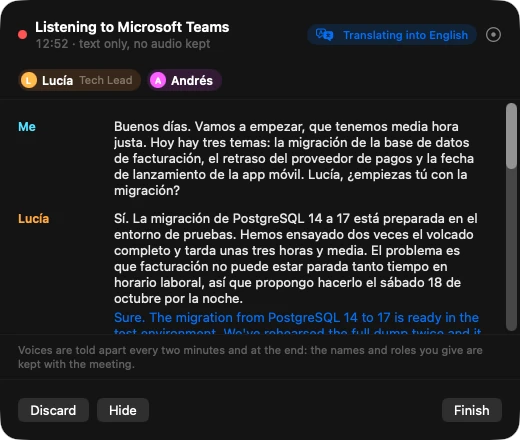
The live panel moves around the screen and resizes, or folds into a red dot that pulses with the voices — orange when the others speak, blue when you do — so you know it's still listening without it covering anything.
Name each voice as you talk
Every two minutes, Quill tells apart the voices in what it has heard so far and shows them at the top of the panel: "Person 1", "Person 2"… Click one, give it a name and a role — Lucía, Tech Lead — and from then on every sentence carries her name.
To be clear about what it measures: in a test meeting with five real voices, names given in the first minutes point at the right person for about 75–80 % of what they say, and around 90 % from minute eight, once it has heard enough of each. Two very similar voices can be merged at first. That's why any name can be corrected at any time, and when the meeting ends the voices are told apart again with the whole meeting.
If the meeting is in another language, you follow it anyway
When the meeting isn't in your language, each of the others' sentences appears with its translation underneath. Apple's translator does it, also on your Mac. The first time, it asks you to download the language pack.
When you hang up, the minutes — weighted by role
When it ends, a single window opens with everything in view: the people, with how much each one spoke; the analysis; and the transcript, which you can search or filter by person.
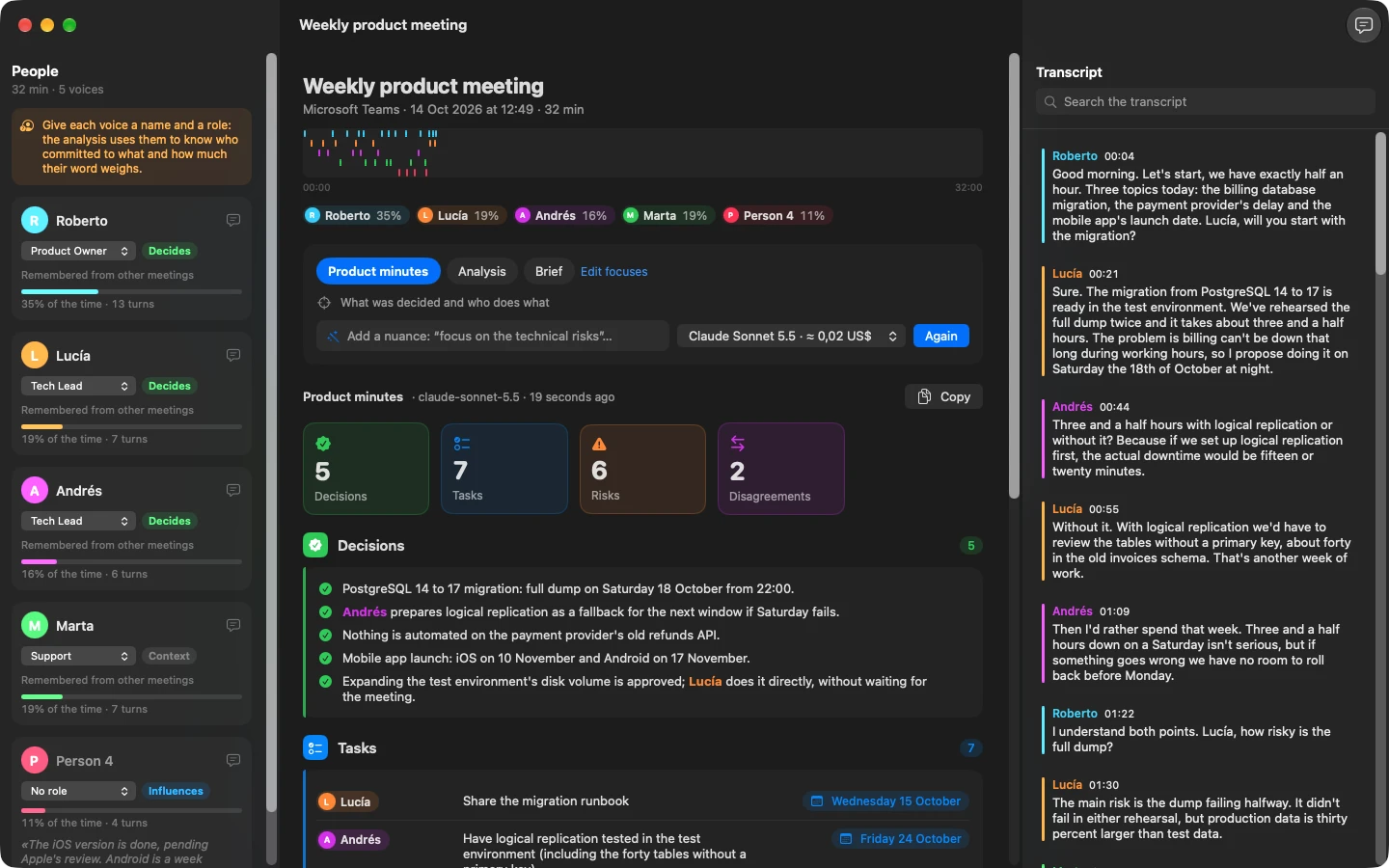
The analysis depends on what you want it for. Quill comes with three focuses, and you can make your own:
- Product minutes: decisions, tasks in a table with owner and date as they were said ("no date" if nobody gave one), risks and disagreements.
- Analysis: each topic with the options on the table, who argued for each and why, and what was decided and why.
- Brief: five lines for whoever wasn't there.
And not every opinion weighs the same in every meeting. In product minutes, what the Product Owner says is a decision and what support says is context; in an analysis everyone's arguments matter. Each person has a role that Quill remembers for the next meeting, and each focus says how much each role counts. You adjust it with a click, for that meeting only if you like.
The analysis is written by the model you choose — the same one you use for rewriting: OpenRouter, Vercel, OpenAI or your own server — and in your language even if the meeting was in another. Before sending anything the first time, it tells you who gets it.
What leaves your Mac and what doesn't
- The audio, never. It stays in memory while the meeting lasts and is never written to disk.
- Transcription, voices and translation happen on your Mac.
- Only the text goes to the model, and only when you ask for the analysis.
- No bot, no account and no server of its own. Meetings are kept on your Mac for as many days as you decide.
Measured with real voices, not by eye
Trying it for a while isn't enough to know it works. I built a bench of meetings with a known answer — real people's voices, with and without background noise, and a real recorded meeting — that runs through the same engine Quill uses and can be run again. On a ten-minute Spanish meeting with five real people:
| What's measured | Result |
|---|---|
| Words transcribed wrong | 3.4 % (4.1 % with background noise) |
| Voices told apart | 5 of 5 |
| Words attributed to the right person | 90 % (95 % with noise) |
| Time to process the 10 minutes | about 12 seconds |
The bench and its results are in the code, including what it doesn't do well yet.
Getting started
- Download Quill, open the DMG and drag it to Applications.
- Join a call, in Teams, Zoom, Meet or whatever you use. Quill offers to transcribe it; pick the language and accept. The first time it asks for permission to record the system's audio and the microphone, and downloads the language's speech model.
- When you hang up, name any voices still unnamed, pick the focus and press Synthesise (⌘↩).
What it doesn't do (yet)
- Tried in real calls only in Microsoft Teams. It works the same way with Zoom, Webex, Slack, FaceTime, GoTo Meeting, Gather, Discord, WhatsApp, Telegram, Signal and any meeting in a browser, and with other apps from the menu's "Transcribe a meeting", but I haven't tried them in real calls yet. If you use it with one of them, it helps me a lot to hear how it goes on GitHub.
- It doesn't recognise a person from one meeting to the next by their voice. It remembers their role when you type their name again, but the name is yours to give.
- The analysis needs a model. Apple's can write a draft on your Mac, but in testing it doesn't get owners and dates right often enough, so Quill marks it as a draft; for reliable minutes you need a provider's key or your own server.
- It needs macOS 26 or later on a Mac with Apple Silicon.
If your meetings are two people and you already take good notes, you may not need it. If you leave every call trying to remember who said what, Quill is my way of having the minutes done when you hang up: quill.rrios.dev.
And if what's hard is writing the message afterwards, it helps with that too: how to rewrite your Teams messages in the right tone.